Survey data export
In addition to customizing individual survey elements, Kameleoon provides global settings that define how your survey behaves and how responses are handled. The Survey Settings tab appears automatically in the Widget Studio when at least one survey element is added to your widget. Survey Settings lets you configure how and when survey responses are submitted, and where they are collected.
Survey Settings tab
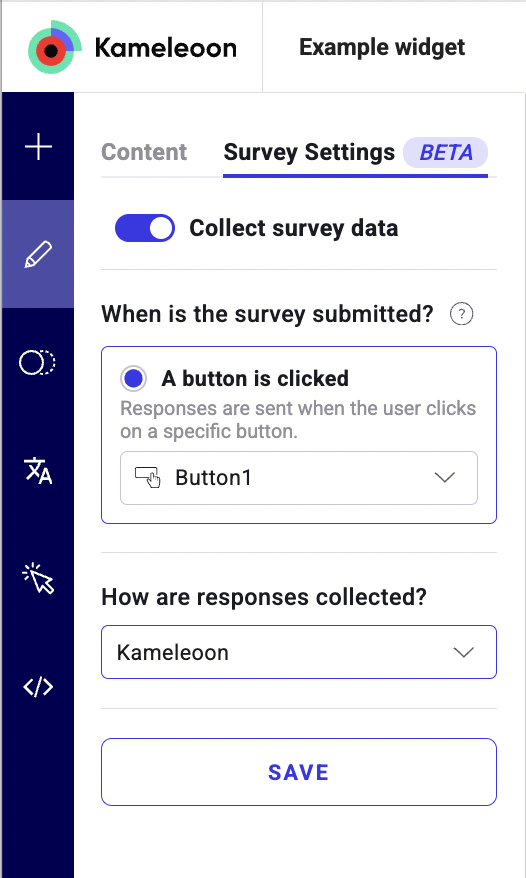
When at least one survey element is present in your widget, a new Survey Settings tab appears in the sidebar. It includes:
Submission trigger
Define when the survey is submitted:
- Button click
- Select one Button element from your widget.
- Only one button can act as the submission trigger.
- When the widget is closed
- Responses are sent automatically when the user closes the widget.
- When an answer is selected
- Responses are sent as soon as a user selects an answer.
- This option is only available if the widget contains one of the following elements:
- Multiple Choice
- NPS
- Scale
You must select the applicable trigger element, such as a button or a specific answer type, to enable the submission process.
Response collection
Select where the survey responses should be sent.
Kameleoon (CSV)
- Store and export survey responses directly from your Kameleoon account.
- To retrieve the responses:
- Link the widget to an active campaign.
- Open the Widgets section.
- Click the three-dot menu on the widget card.
- Select Export survey data (.csv).
- The CSV includes:
- Response timestamps
- Visitor code
- Answers per question
- Campaign and variation details
HTTP request (external)
Send survey responses to a third-party system or your own server.
| Setting | Description |
|---|---|
| Request name | Internal identifier used to track request success or failure. |
| Method | HTTP method (GET or POST). |
| Action URL | Destination URL where the data is sent. |
| Headers | Optional custom headers (for example, API keys or content type). |
Use HTTP requests to integrate survey submissions into your CRM, support platform, or analytics pipeline.
Conditional logic
Survey elements support conditional logic, allowing you to display a question only if a specific answer is selected.
To learn how to configure conditional rules, refer to the Create conditional logic in your surveys article.