Import designs from Figma
You can import Figma designs directly into Kameleoon to use in prompt-based experiments. This Figma-to-prompt integration lets you transform your Figma frames into functional website elements without manual coding.
Access the Figma integration
The Figma icon appears in the prompt area of the PBX interface. You can find it to the right of the + icon, which you use for sketch or mockup imports.
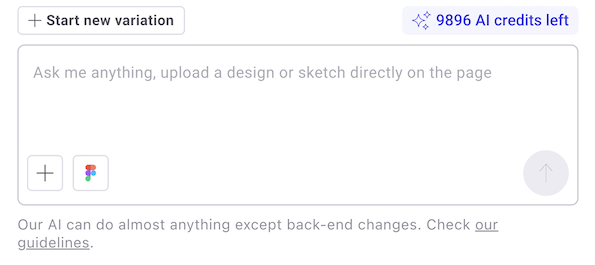
For more information on navigating the PBX interface, refer to Create a prompt-based experiment.
Link your Figma account
The first time you link Kameleoon to Figma, you must authorize access.
- Click the Figma icon in the prompt area or paste your Figma link into the prompt area.
- In the pop-up, click Sign in to Figma.
- In the new tab that opens, click Allow access to authorize the "PBX by Kameleoon" app.
Import a design
To import a design, use a link to the specific Figma node you want PBX to use as an input.
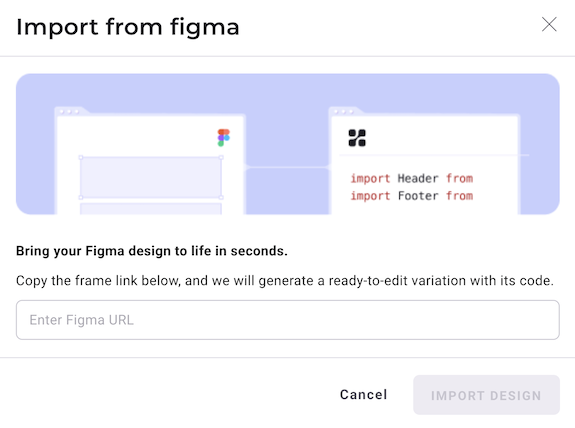
- In Figma, right-click the frame you want to import.
- Select Copy as > Copy link to selection.
- In the Kameleoon PBX interface, perform one of the following actions:
- Paste the Figma link directly into the prompt area.
- Click the Figma icon, paste the link into the Import from Figma pop-up, and click Import design.
PBX requires a link to a specific Figma node (such as a frame) rather than a general file URL.
After you import the design, the Figma frame appears at the top of the PBX prompting window and PBX begins creating the design on your page once you send your prompt. Click the X icon to remove the Figma frame from the prompt.
Important considerations
Keep the following requirements and limitations in mind when using the Figma integration:
- Authentication: You must be signed in to your Figma account and authorize Kameleoon to access your design files.
- Rate limiting: The Kameleoon Figma integration adheres to the rate limits enforced by Figma, which vary depending on your subscription plan seat.
- Asset extraction: Kameleoon cannot currently extract assets, such as images or vector icons, directly from Figma files.
- Asset replacement: PBX replaces these assets with SVGs or asks you for the image or icon URL through clarifying questions during the generation process.
Kameleoon is working to include direct asset extraction in future versions of the integration.