How Kameleoon tracks and counts unique users
Kameleoon tracks your usage based on one of two measurement models, depending on your chosen pricing plan: Monthly Unique Users (MUU) or Monthly Tracked Users (MTU).
Kameleoon features a native consent management system and only collects data from users who provide consent. Learn more about Kameleoon’s consent management policy.
If your website experiences bot traffic, exclude it from your campaign results. Learn how Kameleoon filters bot traffic.
Kameleoon counts users only once, even if they participate in different experiments or feature flags across multiple devices.
Measurement models
Kameleoon offers two primary measurement models. The main difference between them is whether you pay for your potential traffic or your actual campaign engagement.
Monthly Unique Users (MUU)
The MUU model (standard for Enterprise plans) is based on the total traffic visiting your website or application.
- How it works: Kameleoon calculates your usage based on the average number of unique monthly visitors over a 12-month period. It counts a user as soon as they visit your site, regardless of whether they interact with an experiment.
- Why choose it?: It provides cost predictability. Because you pay based on total traffic, you can run unlimited experiments and allocate 100% of your traffic to them without additional costs.
- Best for: Teams that run many experiments or high-traffic tests and want to avoid worrying about "spending" a quota on every test.
Monthly Tracked Users (MTU)
The MTU model (standard for Starter plans) is based on campaign engagement.
- How it works: Kameleoon only counts a user as an MTU when they interact with an active campaign, such as an experiment or a feature flag.
- Why choose it?: It provides cost flexibility. You only pay for the visitors you actually "touch" with your experiments. This model is ideal if you only test on specific visitor segments or low-traffic journeys.
- The trade-off: Pushing high-traffic experiments (like a 100% allocation to a winning variant) or experiencing traffic spikes in an experiment will consume your MTU quota faster.
- Best for: Brands with selective testing needs or those who want to scale their costs exactly with their testing activity.
Model comparison at a glance
| Comparison | MUU Model (Total Exposure) | MTU Model (Engagement Based) |
|---|---|---|
| Who is counted? | Every visitor to your site. | Only visitors in an experiment/flag. |
| Predictability | High; costs stay stable as you test more. | Variable; costs depend on your testing activity. |
| Experiment limits | Unlimited; no campaign or traffic caps. | Capped; limited by your monthly user quota. |
| Traffic spikes | Spikes in site traffic do not affect billing. | Spikes in experiment traffic can reach limits. |
| Winning variants | Pushing 100% traffic is "free." | Pushing 100% traffic costs more MTUs. |
Web Experimentation
Users are measured based on cookies. A cookie is a file placed in a browser that contains an anonymous unique identifier, called the Kameleoon visitorcode, randomly assigned to a user. This ID is used to identify a browser. A visitorcode is stored for 365 days on the user's browser.
Feature Experimentation
Refer to this FAQ in our developer documentation for more information on how Kameleoon counts and tracks unique users in Feature Experimentation.
MTU details
MTU represents the number of unique visitors exposed to at least one Kameleoon experiment or feature flag within a calendar month.
Kameleoon uses the following logic to count MTUs:
- De-duplication: Kameleoon counts each visitor only once per calendar month, regardless of how many times they visit your site or how many experiments they trigger. For example, if a user participates in three different experiments in one month, they still only count as one MTU.
- Visitor Identification:
- Anonymous visitors: Kameleoon identifies anonymous visitors using a unique
visitorcodestored in a browser cookie. - Identified visitors: If you provide a custom unique ID (such as a login ID), Kameleoon can de-duplicate those users across different devices and browsers, ensuring they only count as one MTU.
- Anonymous visitors: Kameleoon identifies anonymous visitors using a unique
- Monthly Reset: Your MTU count resets to zero at the beginning of each calendar month.
View MTU counts
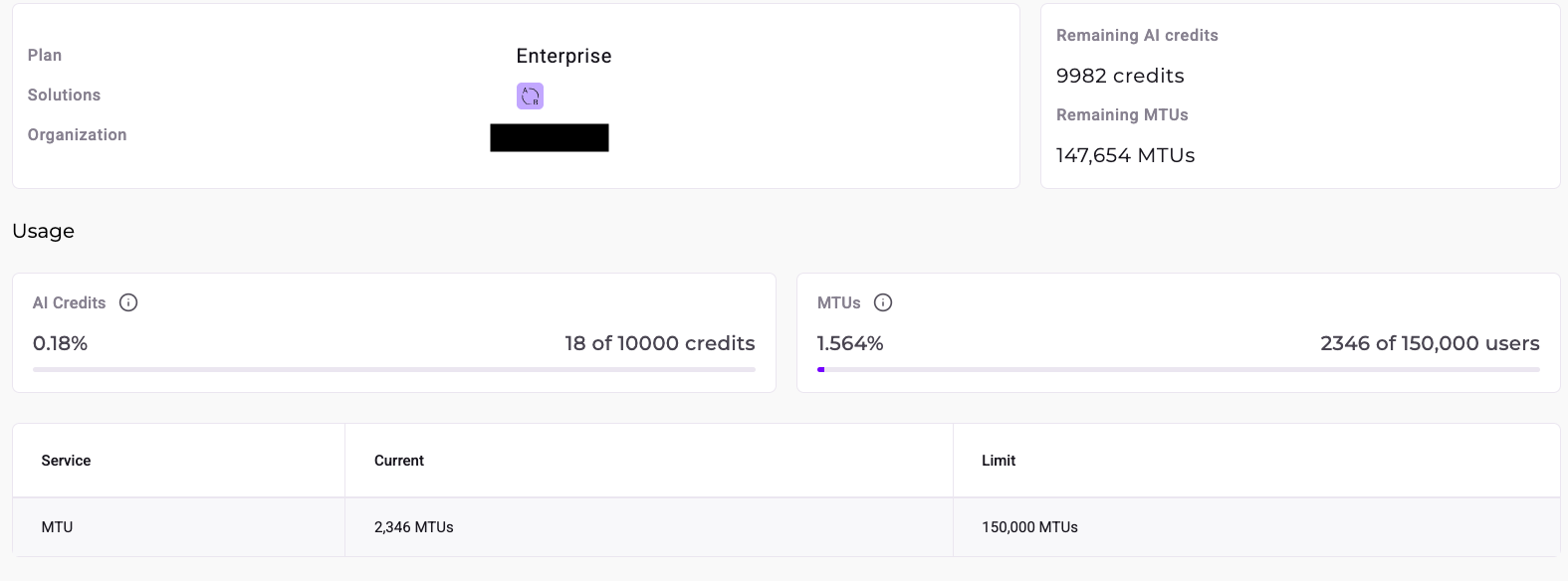
You can view your current MTU count on the Organization page (click Admin and select Organization).
Threshold notifications
Kameleoon displays warning banners and sends email notifications when you reach the following thresholds:
- 90% of the MTU limit.
- 100% of the MTU limit.
- Three days after reaching 100% of the MTU limit.
Thresholds are also reflected on the Organization page.
Reaching the limit
If you reach the MTU limit, Kameleoon grants a three-day grace period to request an upgrade. If you do not upgrade within that period, Kameleoon automatically pauses all active campaigns.
When campaigns are paused, the MTU count resets at the end of the monthly period, and paused campaigns automatically resume.